How to put your label maker to good use
An IT pro shares tips. (Like, don’t use marker!)
• 4 min read
In a flashy tech world of curved monitors, AI-powered coding, Flipper Zeros, and command-line hacks, sometimes an IT job just calls for the humble, reliable label maker.
A recent Spiceworks survey found that about one-fifth of the poll’s 265 respondents consider the label maker as the “MVP” of their IT toolbag. It wasn’t the GOAT for the majority, however; that #1 spot went to the multi-bit screwdriver.
We spoke with Bob LaDouceur, COO and co-founder at CSP Consultants Group, a firm providing design and IT support services to the commercial real estate market. No stranger to the benefits of a good label maker, he shared what hardware requires identification, and what can go wrong when there’s no tags.
Scenario 1: Easy mode. A few desks, a few cables, and a printer that’s not working.
Labeling cables, as well as the faceplate they connect to, is standard practice, LaDouceur said. If someone’s phone goes down or the floor’s printer stops working, a properly labeled faceplate can guide an office IT pro to the right port in the server room to troubleshoot.
For those totally new to IT, companies may run Ethernet cables from an employee’s workstation through a wall faceplate, into the ceiling, and back to a server room. In turn, those cables may end up in a multi-port switch, or a multi-port patch panel leading to a switch. That’s why it can prove useful to label, well, everything: cables, faceplates, and ports in the server room certainly.
But what’s the best way to actually label? Every cable in server racks (like the one shown below) should have a unique identifier that can help the resident troubleshooter trace patch panel cords to desks, with no guesswork (or crawling) required.


Power distribution units (“PDUs”), too, are clearly labeled to prevent costly confusion during maintenance, moves, or outages, especially in high-density racks. (Credit: LaDouceur)
There are labeling standards, which pull together floor location, team, patch panel location on a rack, and port number on the patch panel. However, it’s important for everyone on an IT team to agree to the same schema.
“I’ve seen there be different technicians, and one technician will use this labeling scheme, and then another one will use another labeling scheme for a different section of the building. So, you want to make sure that your labeling scheme is consistent throughout,” LaDouceur said.
From cybersecurity and big data to cloud computing, IT Brew covers the latest trends shaping business tech in our 4x weekly newsletter, virtual events with industry experts, and digital guides.
By subscribing, you accept our Terms & Privacy Policy.
Scenario 2: Intermediate mode. The smart TV at the front desk isn’t working and you really don’t want to have to take it off the wall.
LaDouceur recommends labeling TVs, cameras, wireless access points, and other office devices. The labels can match up to spreadsheets, allowing IT pros to check details like serial numbers without having to rip something from the ceiling.
A labeled wireless access point in the ceiling grid, for example, can help IT teams identify and troubleshoot devices from the safety of the ground. The ID can match up to inventory documentation containing model numbers, warranty info, and more.

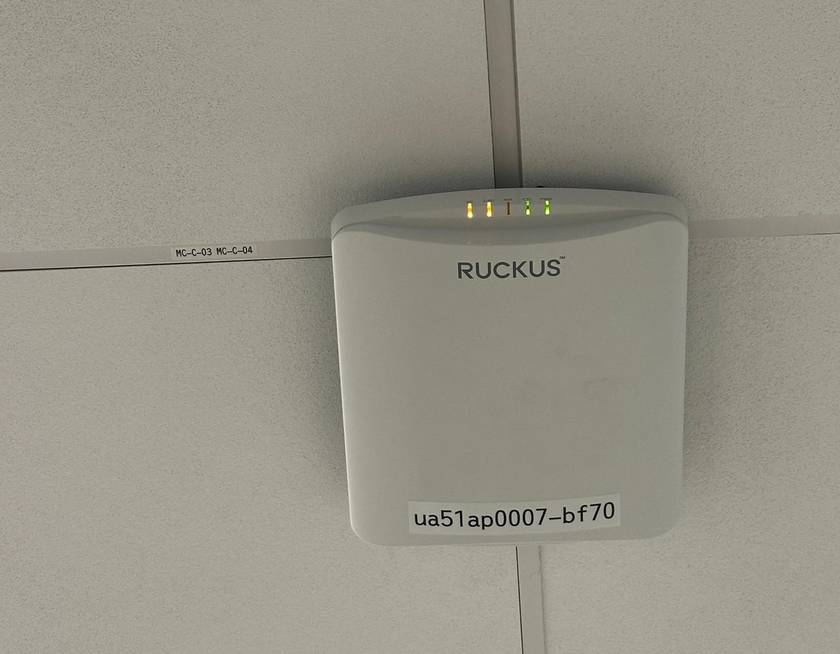
A labeled wireless access point (Credit: LaDouceur)
Security cameras can also use a label for fast identification if a device goes offline or needs servicing.


A labeled security camera (Credit: LaDouceur)
Scenario 3: Hard mode. Moving day!
Maybe your organization is changing addresses. Or maybe you’re shifting all the cubicles on the floor and need to make sure connections remain.
LaDouceur has seen scenarios where IT pros labeled cables poorly with markers, as well as ones where companies didn’t label their ports in the server room—which leads to a tough day if you’re moving desks and other equipment.
“If you have 100 cables that aren’t labeled, you’re pretty much having to start over fresh and trace every cable and hire someone for a week to come in and do all that work; whereas, if it’s labeled properly in the beginning, you eliminate all that time and headache, because you already know what cable is what out on the floor,” LaDouceur said.
LaDouceur said his team recently finished an upgrade for a client that involved a rearrangement of over 200 desks. The team had to trace and label cables properly; he hopes his work allows future IT pros to leave their own label makers at home: “Going forward, if they do have to rearrange again, that won’t be an issue, and they’ll save all that money.”
About the author
Billy Hurley
Billy Hurley has been a reporter with IT Brew since 2022. He writes stories about cybersecurity threats, AI developments, and IT strategies.
From cybersecurity and big data to cloud computing, IT Brew covers the latest trends shaping business tech in our 4x weekly newsletter, virtual events with industry experts, and digital guides.
By subscribing, you accept our Terms & Privacy Policy.